Pay in installments of $6.04 with
 ,
 and

Shipping Estimate
USA
- USA
- CAN
- USA
- CAN
Ships within 48 hours · Estimated delivery Nov 14 - Nov 19
 Promo Codes Available:
For Your Every Summer RSVP, with Code: SUMMER15
Description
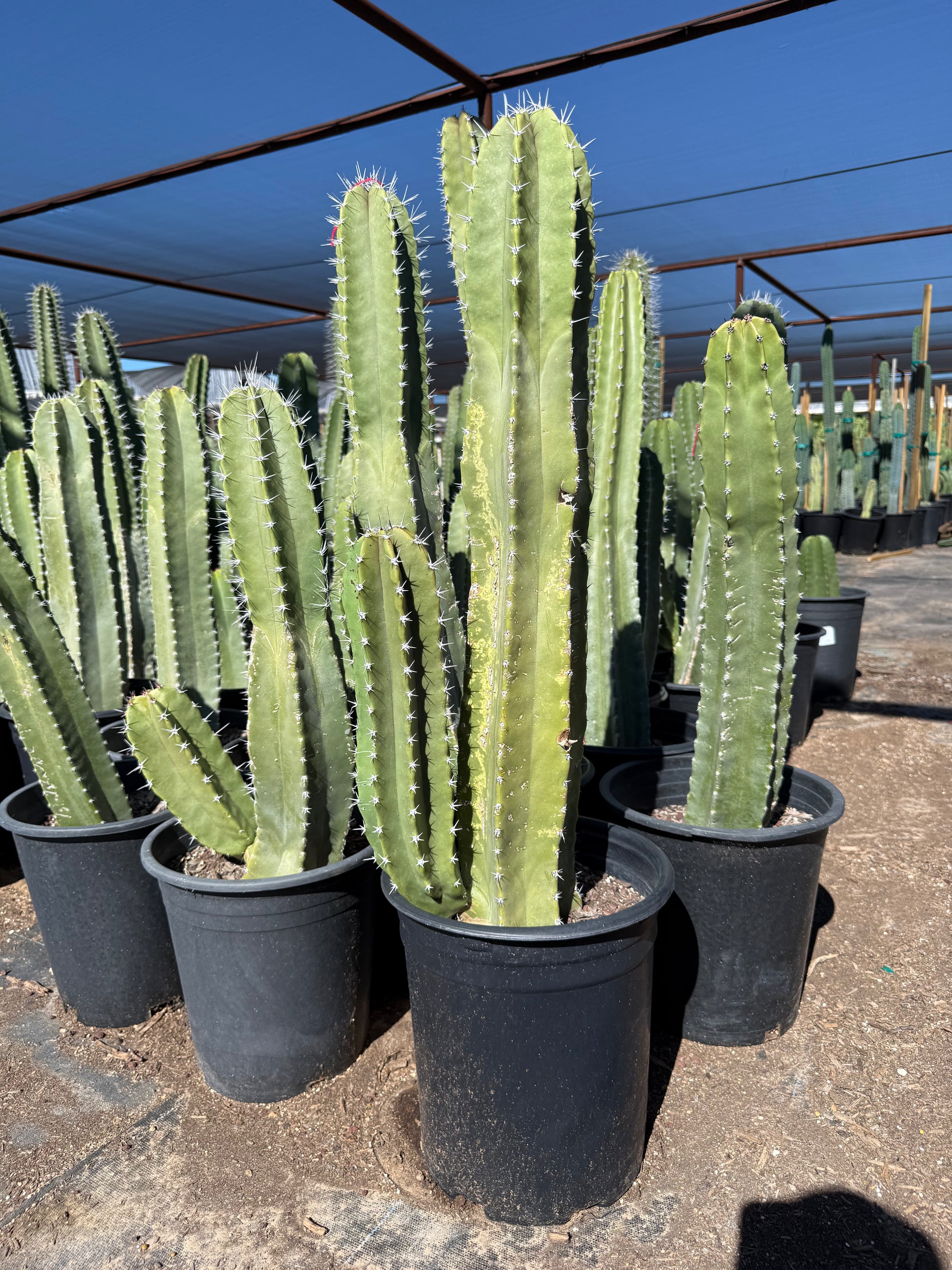
ventura cactus & succulents Buy Senita Cactus Phoenix, AZ | Lophocereus schottiiArizona's Iconic Whiskered Columnar Cactus for Desert Landscapes The Senita (Lophocereus schottii) is one of the Sonoran Desert's most distinctive columnar cacti. As it matures, the stem tips develop dense clusters of long, gray, hair like spines the "whiskers" that give the Senita its unmistakable look. Growing 1020 feet tall with multiple upright stems, this native Arizona cactus creates a dramatic, museum quality presence in any landscape. Whether
Arizona's Iconic Whiskered Columnar Cactus for Desert Landscapes
The Senita (Lophocereus schottii) is one of the Sonoran Desert's most distinctive columnar cacti. As it matures, the stem tips develop dense clusters of long, gray, hair-like spines — the "whiskers" that give the Senita its unmistakable look. Growing 10–20 feet tall with multiple upright stems, this native Arizona cactus creates a dramatic, museum-quality presence in any landscape. Whether you're designing an authentic Sonoran garden in Scottsdale, creating a dramatic entry planting in Mesa, or building a native desert collection in Chandler — the Senita brings a piece of Arizona's wild desert heritage to your yard.
Senita Plant Details
| Attribute | Detail |
|---|---|
| Scientific Name | Lophocereus schottii |
| Common Names | Senita, Old Man Cactus, Whisker Cactus, Schott's Cereus |
| Mature Height | 10–20 feet |
| Mature Width | 6–10 feet (multi-stemmed clumps) |
| Growth Rate | Moderate — 6–12 inches per year in Phoenix |
| Sun | Full sun (6+ hrs). Handles reflected heat from walls and pavement. |
| Water | Very low once established. Extremely drought-tolerant. |
| USDA Zones | 9b–11 (Phoenix is Zone 9b–10a) |
| Soil | Well-draining. Adapts to Arizona caliche soils with adequate drainage. |
| Foliage | Evergreen — gray-green stems with distinctive gray whisker spines on mature growth |
| Bloom | Small pink nocturnal flowers in spring, pollinated by senita moths |
| Native Range | Sonoran Desert — Arizona, Baja California, Sonora Mexico |
Senita Uses in Phoenix Landscapes
Native Sonoran Desert Garden
The Senita is an essential species for authentic Sonoran Desert landscape design. Its multi-stemmed columnar form with signature gray whiskers creates a look that's uniquely Arizona. Pair with native Saguaro, Organ Pipe, Palo Verde, and Desert Ironwood for a landscape that looks like it belongs in Organ Pipe Cactus National Monument. This approach is especially popular in Scottsdale, Cave Creek, and Fountain Hills.
Architectural Focal Point
A mature Senita with its fan of upright stems topped by flowing gray whiskers is a living sculpture. Plant one as a standalone specimen against a clean stucco wall or in a raised planter for maximum drama. The whiskers catch the wind and create beautiful movement, adding a kinetic quality that static garden elements can't match.
Desert Entry & Courtyard Planting
Frame a front entry or courtyard gate with Senita specimens for an authentic Arizona welcome. The multi-stemmed habit fills space beautifully, and the whisker-topped stems create visual interest at eye level and above. Combine with lower-growing Agave, Golden Barrel, or Desert Spoon for a layered composition that greets visitors with desert elegance.
Wildlife & Pollinator Gardens
The Senita has a fascinating ecological relationship with the senita moth — one of nature's most specialized pollination partnerships. The small pink nocturnal flowers attract these moths and other desert pollinators. For homeowners in Tempe, Gilbert, Peoria, and Glendale who want to support native desert ecology, the Senita is a meaningful and beautiful choice.
Best Time to Plant Senita in Phoenix
Fall (October–November) is ideal. Warm soil supports root development while cooler air minimizes transplant stress. Senita is slightly cold-sensitive when young, so fall planting gives it maximum time to establish before winter. Spring (February–April) is the second-best window. Avoid summer planting, and protect young plants from frost during their first 1–2 winters.
How to Plant Senita
- Dig wide, not deep — 2–3x the root ball width, same depth as the nursery container.
- Check for caliche — break through any hardpan layer completely. Senita will not tolerate standing water.
- Backfill with native soil — amend with 20–30% coarse sand or pumice for excellent drainage.
- Spacing — 6–8 feet apart for groupings; give individual specimens room to develop their full multi-stemmed spread.
- Staking — large box specimens may need temporary staking for 6–12 months until roots anchor.
- Gravel mulch — 2–3 inches of decomposed granite or decorative rock. Avoid organic bark mulch against stems.
Watering Senita in Phoenix
First Year Watering Schedule
Weeks 1–2: Every 4–5 days, deep and slow. Month 1–3: Every 7–10 days. Month 3–6: Every 10–14 days (every 7 days in peak summer). After Year 1: Every 2–4 weeks in summer; once a month or less in winter. Established Senita is extremely drought-tolerant and can survive on rainfall alone.
Drip Irrigation Tips
Place one 2 GPH emitter 18–24 inches from the base. For multi-stemmed clumps, use two emitters on opposite sides. Reduce irrigation dramatically after the first year — Senita is a true desert species that rots quickly if overwatered.
How fast does Senita grow in Phoenix?
Moderate growth at 6–12 inches per year. The whisker spines typically develop once stems reach 4–6 feet. A 5-gallon plant will take 4–6 years to develop the signature whiskered look, but larger specimens (15+ gallon) may already show whiskers.
When do the whiskers appear?
The gray, hair-like spines develop on mature stem tips, typically once the plant reaches 4–6 feet tall. Buying a larger specimen (15 gallon or box size) gives you the whiskered look immediately.
Is Senita related to Totem Pole cactus?
Yes! Totem Pole (Lophocereus schottii var. monstrosus) is a monstrose mutation of the Senita. They share the same species, but Totem Pole has smooth, spineless stems while Senita develops the characteristic whisker spines.
Is it frost-hardy in Phoenix?
Hardy to about 25–28°F. Young plants are more cold-sensitive — protect with frost cloth during the first 2–3 winters. Established plants handle typical Phoenix winters without issue, but avoid planting in known frost pockets.
You May Also Like
Totem Pole Major — the smooth, spineless monstrose form of the same species, a perfect companion planting.
Arizona Organ Pipe — another native Sonoran columnar cactus with a multi-stemmed growth habit.
Saguaro — Arizona's iconic columnar cactus, a natural companion for Senita in authentic desert gardens.
Old Man of Mexico — another "hairy" columnar cactus with long white hair instead of gray whiskers.
How Many Senita Do I Need?
Senita is an architectural specimen, not a hedge plant. Its multi-stemmed clumps reach 6 to 10 feet wide at maturity, so give each plant room to spread. Plant one as a standalone focal point against a wall or in a courtyard, or set them in odd-numbered groups of 3 to 5, each 6 to 8 feet apart, so every whiskered clump stands clear. Because the stems carry stiff whisker spines, keep specimens at least 3 feet back from walkways, patios, and pool edges.
Senita Season-by-Season in Phoenix
- Spring (Feb-Apr): Small pink flowers open at night and draw the specialized senita moth. A good second planting window once soil warms.
- Summer (May-Sep): Steady growth through the heat, shrugging off reflected warmth from walls and pavement. Needs very little supplemental water once established.
- Fall (Oct-Nov): Prime planting season, giving roots maximum time to anchor before winter.
- Winter (Dec-Jan): Evergreen gray-green structure holds year-round. Hardy to about 25 to 28°F: cover young plants with frost cloth during hard freezes and avoid known frost pockets.
At a Glance
✔ Arizona Native ✔ Heat-Loving (Reflected-Heat Tolerant) ✔ Drought-Tolerant ✔ Pollinator-Friendly ✔ Evergreen ✔ Low-Maintenance ✔ Fire-Wise ✔ Deer & Rabbit-Resistant ✔ Cold-Hardy to 25°F
Plant It With
- Totem Pole Major: the smooth, spineless form of the same species for a striking contrast.
- Organ Pipe: another native multi-stemmed Sonoran columnar for an authentic desert grouping.
- Saguaro: Arizona's icon, the natural backdrop for a native desert garden.
- Old Man of Mexico: a hairy columnar that echoes Senita's whiskered texture.
Is Senita Right for Your Yard?
Senita thrives in full sun with fast-draining soil and tolerates reflected heat off walls and pavement, making it ideal for authentic Sonoran and low-water gardens. Break through any caliche so water drains freely, since this true desert species rots quickly in wet ground. It is not a fit for shaded, soggy spots, tight planting strips, or right against high-traffic walkways where the whisker spines could be a hazard.
Shipping Notes
- Free Standard Shipping on $100+ Orders to the USA.
- Except Preorder products are shipped in 48 hours.
- Delivery to the USA:
- Standard Shipping : 3-10 business days
- If time is of the essence, please consider selecting expedited delivery for faster service.
Exchange/Return Notes
- We offer a 30-day return/exchange service after receiving.
- Final sale items are not eligible for returns or exchanges.
- To process your return/exchange, please contact us at [email protected]
- Please click here for more details>>> Return & Exchange Policy