SKU: 35735937207
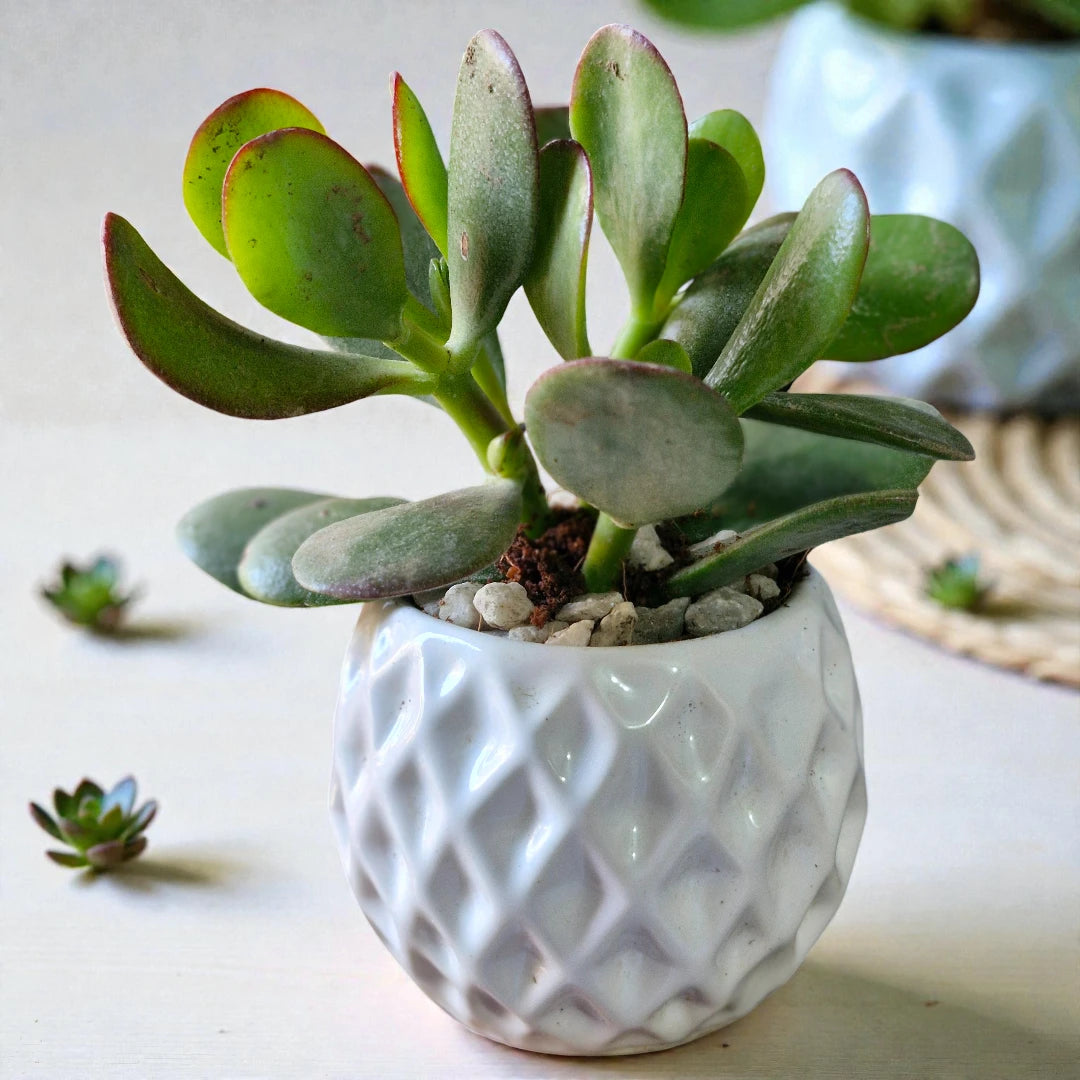
jade plant cost in india

jade plant cost in india Buy Crassula Jade plant

Sale price$23.48 Regular price$26.09
Save 10%

Pay in installments of $6.52 with ShopPay, AfterPay and Klarna

Shipping Estimate
USA
  • USA
  • CAN

Ships within 48 hours · Estimated delivery Nov 26 - Dec 1

Promo Codes Available:

For Your Every Summer RSVP, with Code: SUMMER15

Description

jade plant cost in india Buy Crassula Jade plantBare rooted plant Dispatch in 2 3 days Country of origin: India It's Compulsory to make unboxing video of parcel for refund within 24 hours Overview of Crassula Jade Plant Common Name: Jade Plant Botanical Name: Crassula ovata Family: Crassulaceae Type: Succulent, perennial Mature Size: 36 ft. tall, 23 ft. wide Native Area: Southern Africa Hardiness Zones: 1112 (USDA)The jade plant, also known as the money tree or friendship plant, is a popular

• Bare rooted plant
•
Dispatch in 2-3 days
• Country of origin: India

It's Compulsory  to make unboxing video of parcel for refund within 24 hours

Overview of Crassula Jade Plant

Common Name: Jade Plant
Botanical Name: Crassula ovata
Family: Crassulaceae
Type: Succulent, perennial
Mature Size: 3–6 ft. tall, 2–3 ft. wide
Native Area: Southern Africa
Hardiness Zones: 11–12 (USDA)The jade plant, also known as the money tree or friendship plant, is a popular houseplant recognized for its thick, glossy leaves and its association with good luck and prosperity. This succulent is relatively easy to care for, making it a favored choice among both novice and experienced gardeners.

Care Instructions

Light Requirements

  • Ideal Exposure: Jade plants thrive in bright, indirect sunlight. A south-facing or west-facing window is ideal, providing at least four to six hours of light daily.

Soil and Potting

  • Soil Type: Use a well-draining soil mix designed for succulents or cacti. A blend of organic matter (like peat moss) and gritty materials (such as sand or perlite) works best.
  • Potting Tip: Ensure pots have drainage holes to prevent water accumulation, which can lead to root rot.

Watering

  • Watering Schedule: Water thoroughly but allow the soil to dry out completely between watering sessions. During the growing season (spring and summer), water more frequently; in winter, reduce watering to about once a month.
  • Signs of Overwatering: Yellowing leaves or mushy stems indicate overwatering.

Temperature and Humidity

  • Optimal Temperature: Jade plants prefer daytime temperatures between 65°F to 75°F (18°C to 24°C) and can tolerate cooler temperatures down to 50°F (10°C) at night.
  • Humidity Needs: They adapt well to average household humidity levels but should be kept away from drafts and extreme temperature fluctuations.

Fertilization

  • Feeding Schedule: Fertilize with a balanced 20-20-20 fertilizer at one-quarter strength during the growing season. Avoid fertilizing when the plant is not actively growing.

Common Issues

Pests

  • Jade plants can be susceptible to pests like mealybugs and aphids. Regular inspections and prompt treatment can help manage infestations.

Diseases

  • Overwatering is the leading cause of disease in jade plants, often resulting in root rot. Proper watering techniques are essential for maintaining plant health.

Frequently Asked Questions

  1. How often should I water my jade plant?
    Water when the top inch of soil feels dry, typically every few weeks during the growing season and less frequently in winter.
  2.  Can jade plants survive outdoors?
    Yes, they can be grown outdoors in USDA zones 11 to 12 but should be brought indoors when temperatures drop below 50°F (10°C).
  3.  Why are my jade plant leaves falling off?
    Leaf drop can result from overwatering, underwatering, or sudden changes in temperature. Assess your care routine accordingly.
  4.  How do I propagate a jade plant?
    Propagation can be done through leaf cuttings or stem cuttings. Allow cuttings to callous for a few days before planting in well-draining soil.
  5. Do jade plants flower?
    Jade plants may produce small white flowers under ideal conditions, typically in late winter or early spring, especially if given a period of dormancy with reduced watering.By following these care guidelines, jade plants can thrive for many years, adding beauty and good fortune to your home.


Shipping Notes
  • Free Standard Shipping on $100+ Orders to the USA.
  • Except Preorder products are shipped in 48 hours.
  • Delivery to the USA:
  1. Standard Shipping : 3-10 business days
  • If time is of the essence, please consider selecting expedited delivery for faster service.
Exchange/Return Notes
  • We offer a 30-day return/exchange service after receiving.
  • Final sale items are not eligible for returns or exchanges.
  • To process your return/exchange, please contact us at [email protected]
  • Please click here for more details>>> Return & Exchange Policy
SKU: 35735937207

Discover Niche Categories That Outsell jade plant cost in india

Top-Converting Item to Boost Your Average Order

4.3 ★★★★★
Based on 28 reviews
Sort
Highest Rating
Newest First
Oldest First
Product Reviews
H
Verified Purchase
Hamid Ahmad
Chelsea, US
★★★★★ 1
Not a good choice.
Style: WF-4820, Set: 1. SINGLE TRAY (250 sheets)/FAX/ADF/PRINT/COPY/SCAN
I recently purchased this printer with high hopes of a reliable and efficient printing solution. Unfortunately, my experience with this printer has been nothing short of a nightmare. Connectivity Woes: The most glaring issue is its abysmal Wi-Fi connectivity. Despite being placed right next to the router, the printer consistently displays a "Poor Wi-Fi Connection" message. This is in stark contrast to all other devices in my home, which work seamlessly with the Wi-Fi network. Even my old laser printer, which is placed close to the same location, functions without any connectivity hiccups. It's baffling how a modern printer can struggle so much to maintain a stable Wi-Fi connection. Scanning Nightmares: The scanning functionality of this printer is equally disappointing. The user interface is far from user-friendly, making it a daunting task to set up scanning to email or computer directly from the printer. This is a basic feature that should be intuitive and hassle-free, but instead, it's a convoluted process that requires unnecessary effort and time. Ineffective Customer Service: I reached out to customer service in hopes of resolving these issues. While they guided me through a reset process, the solutions they provided were only temporary fixes. The problems resurfaced shortly after, leaving me back at square one. It's frustrating to invest in a product only to find that the customer service solutions are inadequate and short-lived. Comparative Performance: What's more perplexing is that my older laser printer, which is from a different brand, continues to perform flawlessly in terms of connectivity and scanning capabilities. This stark contrast highlights the subpar quality of the Epson. Final Verdict: I'm deeply disappointed with this printer and regret this purchase immensely. Its inability to maintain a stable Wi-Fi connection, along with the cumbersome scanning setup and unsatisfactory customer service experience, make this printer a headache rather than a helpful device. I strongly advise against considering this printer if you value reliable performance and user-friendly features. Save yourself the frustration and explore more dependable options on the market.
WAS THIS REVIEW HELPFUL?YesReportShare
Reviewed in the United States on August 10, 2023
S
Verified Purchase
Scott V
Louisville, US
★★★★★ 5
Easy set up on USB cable. Works as expected on my Windows 11 computer
Style: WF-4820, Set: 1. SINGLE TRAY (250 sheets)/FAX/ADF/PRINT/COPY/SCAN
I got this Epson All-In-One printer for my work. I had been using HP printers for years. I started having problems with paper handling on them. Things like getting a paper jam error when there was not paper jammed in it. I decided to try an Epson for a change. I have had the printer now for three weeks. So far it has worked great. Easy to set up on my Windws 11 computer. Works great for printing and for scanning. I have it set up by USB cable because I don't have reliable wireless internet in that part of the building. No issues with the USB configuration. Ink usage seems good so far. Ink on any printer is expensive, but that was expected. I would recommend this printer.
WAS THIS REVIEW HELPFUL?YesReportShare
Reviewed in the United States on March 28, 2026
U
Verified Purchase
user x
New York, US
★★★★★ 4
Much harder to install than expected - especially if you have a comma in your Wifi password
Style: WF-4820, Set: 1. SINGLE TRAY (250 sheets)/FAX/ADF/PRINT/COPY/SCAN
I found this printer surprisingly hard to install. First, I used the software on the DVD that came with the system. That caused my computer to crash and reboot! After it rebooted, I downloaded the (presumably newer) combo installer from the Epson web site. That ran, but when it came time to connect the printer to the wifi network, I found that there is no way in the Epson network configuration wizard to use a comma in the wifi password. There is a period and many other symbols, but I didn't see a comma. But our system admin used a comma in our wifi password, so I couldn't connect the printer to the wireless network. I had to dig up a LAN cable and plug the printer into a network switch, restart the installation and configure the printer for a LAN connection. That seemed to work, at least according to the installer, but when I tried to print a test page there was a print connection failure. After running the "Epson Printer Connection Checker", it found a printer port error and tried to fix it, but was unable to. So, I removed the printer entirely from the computer using Windows device management and had Windows try to detect the printer. That finally worked, although now the Fax device is missing. But at least now I can print, and the print quality looks good. But I'm still frustrated by the inability to connect to the wifi.
WAS THIS REVIEW HELPFUL?YesReportShare
Reviewed in the United States on April 10, 2023
A
Verified Purchase
Albert
Boise, US
★★★★★ 5
Great printer
Style: WF-4820, Set: 1. SINGLE TRAY (250 sheets)/FAX/ADF/PRINT/COPY/SCAN
This printer is compatible with my Apple Mi 4 desktop and my Apple Laptop. I didn’t have a dvd player, so I went to the required Epsom website, and downloaded the software. No issues. All of the bells and whistles on the printer works flawless. Follow the directions and enjoy the results .
WAS THIS REVIEW HELPFUL?YesReportShare
Reviewed in the United States on April 17, 2026
B
Verified Purchase
BM
Belleville, US
★★★★★ 5
Best for Business owners gets the Job done
Style: WF-4820, Set: 1. SINGLE TRAY (250 sheets)/FAX/ADF/PRINT/COPY/SCAN
This Item is outstanding. Why? I've had two HP printers all in ones however, they were okay and did the job the inks are very expensive and not worth the money quite frankly. Now this printer faxes very fast and prints very fast also holds twice the paper in its tray. I like the big readable screen display that's really an asset. The HP always a hard time with big hands to enter numbers into the printer to fax,dial, and configure. This primer comes with the CD ROM if needed. Out of the box set up was indeed a breeze. Ready to go. I was really impressed to say the least. My personal opinion is that I highly recommend this item for small business owners who like to get the job done and quickly. Respectfully Dr. Martin PhD
WAS THIS REVIEW HELPFUL?YesReportShare
Reviewed in the United States on September 21, 2025

recommand products