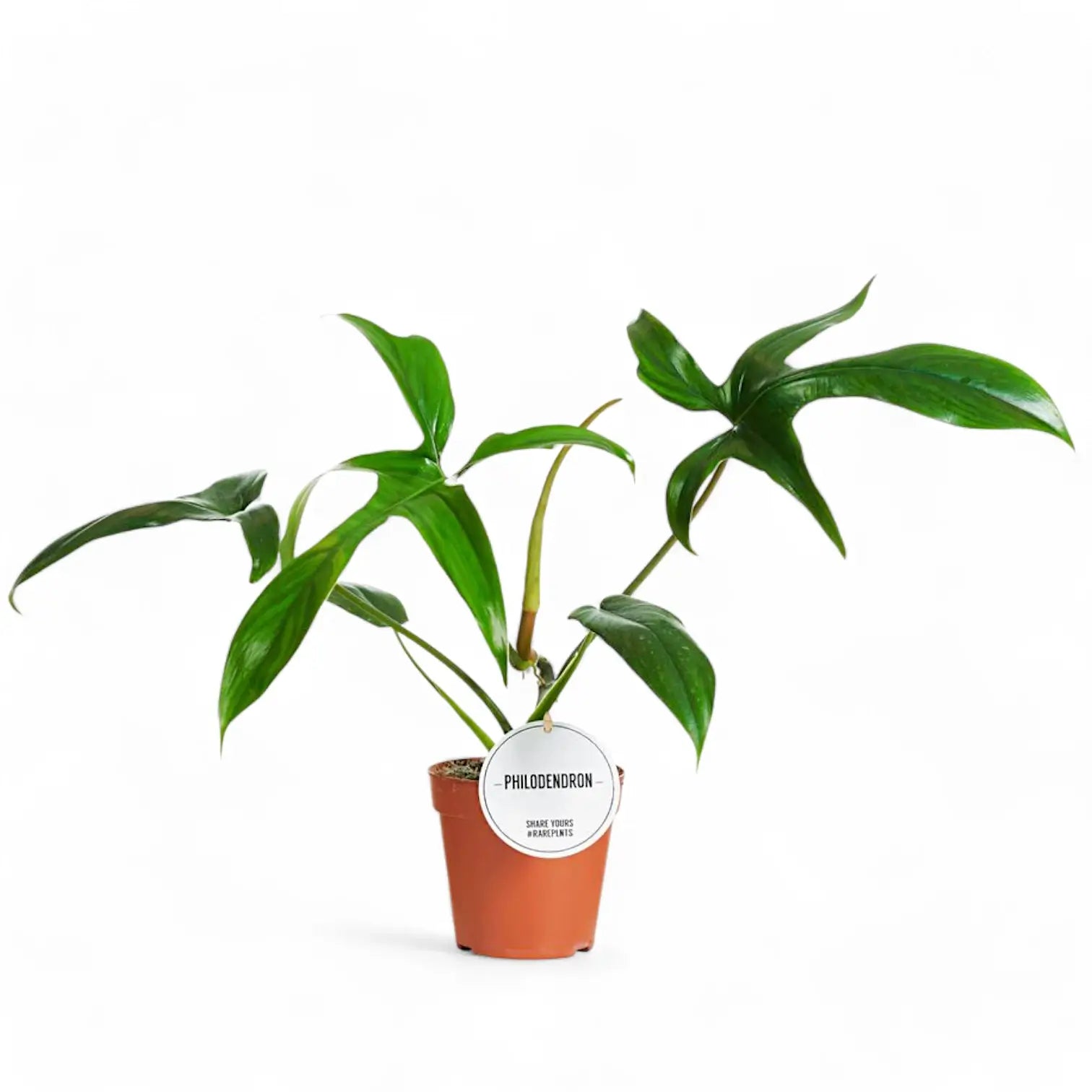
SKU: 44463158355
philodendron quercifolium

philodendron quercifolium Philodendron Glad Hands

Sale price$26.77 Regular price$29.74
Save 10%

Pay in installments of $7.43 with ShopPay, AfterPay and Klarna

Shipping Estimate
USA
  • USA
  • CAN

Ships within 48 hours · Estimated delivery Nov 14 - Nov 19

Promo Codes Available:

For Your Every Summer RSVP, with Code: SUMMER15

Description

philodendron quercifolium Philodendron Glad HandsPhilodendron 'Glad Hands' (quercifolium) Philodendron 'Glad Hands' is a narrow form of Philodendron pedatum, grown for deeply divided leaves with long, slim lobes that spread from the blade like fingers. The full leaf shape develops over time, so young plants can look slimmer and less divided before the stem gains size and support. This plant grows from a climbing stem with clear nodes and aerial roots. As the stem extends, each node can produce

Philodendron 'Glad Hands' (quercifolium)

Philodendron 'Glad Hands' is a narrow form of Philodendron pedatum, grown for deeply divided leaves with long, slim lobes that spread from the blade like fingers. The full leaf shape develops over time, so young plants can look slimmer and less divided before the stem gains size and support.

This plant grows from a climbing stem with clear nodes and aerial roots. As the stem extends, each node can produce another leaf and attach to support through new root points. A pole, plank, or trellis helps the plant anchor, keeps the stem upright, and gives divided leaves space to spread.

Narrow lobes and node-by-node growth

  • Growth habit: Climbing Philodendron with nodes, aerial roots, and a stem that responds well to vertical support.
  • Leaf shape: Long, narrow lobes give older leaves a hand-like outline.
  • Development: Leaf divisions become clearer as the plant gains size, support, and stronger root growth.
  • Petiole spread: Leaves are held away from the stem, so established plants need space around the support.
  • Root behaviour: Aerial roots help the climbing stem attach and support larger foliage over time.

Pedatum background and quercifolium name

Philodendron pedatum (Hook.) Kunth was published in Enumeratio Plantarum 3:49 in 1841. It is an accepted South American species that grows as a climber in wet tropical habitats. Philodendron quercifolium Engl., published in Botanische Jahrbücher für Systematik 26:546 in 1899, is now placed under Philodendron pedatum.

The quercifolium name refers to oak-like divided leaves and still appears around this plant in cultivation. This narrow form shows a slimmer, more finger-like expression of pedatum-style leaf division once the stem is rooted and climbing. Older leaves gain a more defined outline, not just a larger size.

Care for divided leaves

  • Light: Provide bright filtered light. Strong indirect light supports shorter internodes and more developed leaves, while harsh direct sun can scorch exposed lobes.
  • Watering: Water thoroughly once the upper substrate has dried slightly. Keep moisture steady during active growth, but do not leave the pot standing in water.
  • Substrate: Use a chunky aroid mix with bark or coco chips, perlite or pumice, and a moisture-holding base. The roots need both moisture and air around them.
  • Pot choice: Choose a pot with drainage holes and enough depth to hold the support firmly. Avoid oversized pots that keep the lower stem wet for too long.
  • Repotting: Repot when roots fill the pot or the support becomes unstable. Move up gradually so the root zone stays aerated.
  • Support: Add a pole, plank, or trellis early. Attach the stem loosely so aerial roots can reach the support without being crushed.
  • Humidity: Aim for moderate to high humidity. Around 50–70% helps the narrow lobes open without dry tips or tears.
  • Temperature: Keep at about 18–28°C. Cool, wet conditions slow root activity and can damage the lower stem.
  • Feeding: Feed lightly during active growth with a balanced fertiliser. Reduce feeding when light and leaf production slow down.
  • Growth rate: Expect moderate climbing growth once rooted and supported. Leaf shape improves gradually as the stem strengthens.
  • Pruning: Remove yellowing leaves and trim stretched stems above a node if the plant needs reshaping. Healthy cut sections can be used for propagation.
  • Placement: Give the plant room around its support so the lobed leaves can spread without rubbing against walls, shelves, or neighbouring plants.
  • Semi-hydroponics: This Philodendron can adapt to mineral or semi-hydro substrates if roots are transitioned gradually and the reservoir is kept clean.
  • Propagation: Take stem cuttings with at least one node and preferably an aerial-root nub. Keep cuttings warm and humid while roots form.

Juvenile leaves, torn lobes and stem stretch

  • Leaves staying juvenile: Check support, light, and root health. A divided leaf shape develops more reliably on a climbing, well-rooted stem.
  • Yellow lower leaves: Inspect the substrate and roots. Persistent wetness around the lower stem can cause older leaves to decline quickly.
  • Brown lobe tips: Look for dry roots, low humidity, fertiliser buildup, or hot sun through glass.
  • Long gaps between leaves: The stem may be reaching for light or growing away from its support. Move it into brighter filtered light and secure new growth.
  • Torn new leaves: New lobes can catch while unfurling. Keep watering stable and humidity moderate rather than forcing the leaf open.
  • Loose stem attachment: If the stem pulls away from the support, retie it gently at the nodes and guide new aerial roots toward the surface.
  • Pests: Check leaf undersides, petiole bases, and cataphylls for thrips, mites, scale, and mealybugs.

Pet safety and skin irritation

Philodendron 'Glad Hands' should be kept away from pets and children that may chew leaves or stems. Philodendron contains calcium oxalate crystals, which can irritate the mouth, throat, and digestive tract if ingested. Sap may irritate sensitive skin after pruning or propagation.

Name meaning and botanical background

Philodendron means “tree-loving”, a reference to the climbing habit common in the genus. The epithet pedatum means foot-like, matching the divided leaf outline of Philodendron pedatum. Quercifolium combines Latin roots for oak and leaf, referring to an oak-like leaf shape. The name 'Glad Hands' suits the hand-like spread of the leaf lobes.

Choose Philodendron 'Glad Hands' for a climbing Philodendron with slim, fingered leaves and a distinctive narrow-lobed outline.

Shipping Notes
  • Free Standard Shipping on $100+ Orders to the USA.
  • Except Preorder products are shipped in 48 hours.
  • Delivery to the USA:
  1. Standard Shipping : 3-10 business days
  • If time is of the essence, please consider selecting expedited delivery for faster service.
Exchange/Return Notes
  • We offer a 30-day return/exchange service after receiving.
  • Final sale items are not eligible for returns or exchanges.
  • To process your return/exchange, please contact us at [email protected]
  • Please click here for more details>>> Return & Exchange Policy
SKU: 44463158355

Discover Niche Categories That Outsell philodendron quercifolium

Top-Converting Item to Boost Your Average Order

4.7 ★★★★★
Based on 7 reviews
Sort
Highest Rating
Newest First
Oldest First
Product Reviews
C
Verified Purchase
Carrie Foscato Design
Draper, US
★★★★★ 5
My son was impressed
Style: 7 in 1 【1 HDMI】
Been working great. It’s fast and compatible with my Mac. Slim connection so that I can also plug in my external hard drive. Plus, my son was impressed that I got Anker. I’ll be honest, I don’t know companies, but he said I got a good one.
WAS THIS REVIEW HELPFUL?YesReportShare
Reviewed in the United States on May 21, 2026
A
Verified Purchase
Alicia Dixon
West Palm Beach, US
★★★★★ 5
Great basic hub for home
Style: 7 in 1 【1 HDMI】
Makes switching between my work laptop and my personal one so much easier and has charging pass through. Great buy for the price if all you need is a simple hub.
WAS THIS REVIEW HELPFUL?YesReportShare
Reviewed in the United States on April 20, 2026
A
Verified Purchase
Alex
Cuba, US
★★★★★ 5
Great for work
Style: 7 in 1 【1 HDMI】
I bought this to use with my MacBook for work, and it’s been a really useful all-in-one hub. One of the biggest advantages is not having to carry separate adapters for HDMI, USB devices, and SD cards. It makes it much easier to connect everything I need at my desk or when working away from home. The HDMI connection worked well with an external monitor, and the USB ports have been useful for keyboard/mouse and flash drives. The pass-through charging is also a big plus since it lets me keep my MacBook powered while still expanding the number of ports available. That makes a big difference if your MacBook already has limited ports to begin with. I also like that it’s compact and easy to keep in a laptop bag, so it works well for both a desk setup and travel. It can get a little warm during longer use, but that seems pretty normal for a small hub doing multiple things at once. Overall, this has been a helpful and convenient accessory for turning a MacBook into a more practical work setup.
WAS THIS REVIEW HELPFUL?YesReportShare
Reviewed in the United States on April 8, 2026
R
Verified Purchase
RVGregoryZ
Houston, US
★★★★★ 5
My experience with the Anker Products is Great.
Style: 7 in 1 【1 HDMI】
Anker USB C Hub (7-in-1) I now have several Anker Products in my home. These folks just know how to build products. Affordable and durable, stable and easy to use. This 7 in 1 is all Plug and Play. I am using an external power supply, and this product delivers it to all of my connected devices. The stability of every thing plugged into the USB Ports keeps everything connected just as it should. I recommend the Anker Product Line and this product in particular. SO, if you're in need of additional USB Ports, go with Anker.
WAS THIS REVIEW HELPFUL?YesReportShare
Reviewed in the United States on March 2, 2026
B
Verified Purchase
Bimmer369
Phoenix, US
★★★★★ 5
Solid; long lasting
I use this adaptor to hard wire an ethernet internet connection straight into a Samsung Galaxy S10+ with PD (charges phone while connected). I also use an S8+ which works, too. This is a great option for those of us who understand the dangers of being exposed to low-powered microwaves all day and night (AKA Wi-Fi). While hard wired to ethernet, you can enjoy the internet with airplane mode on, which is a big plus! I've used several different branded adaptors (the ones without PD kill your device's battery QUICKLY) for this purpose, and this Anker outshines them all. Most other brands (I've tried Belkin, Ugreen, and some other somewhat obscure brands) work fine for a short time and then begin to get spotty, losing and regaining connection intermittently until crashing and not working at all over a short period of time, usually not longer than 3 to 4 months if you're real lucky. However, I've had this Anker for nearly a year (10 months and change), and it's still going strong. Now, it's not perfect. It does lose connection from time to time and then regain connection just like the others, but nowhere near as frequent, and if you are mindful of the orientation of the cords and take care not to twist or put torque on them once they're connected to a device, it usually keeps connection very nicely. Be sure to put the device in the proper orientation through which you'll be looking at it, and THEN connect the adaptor (don't connect the adaptor and then have to roll the phone over to look at the screen, as this is the fastest way to kill the adaptor and loosen your phone's charging port). When first attaching, I plug the ethernet cable into the adaptor and use a hair-tie rubber band to wrap around the end of the ethernet cable, making sure it's tight with no slack, then I secure it around the BASE of the type-C cable coming out of the opposite end of the adaptor (see attached picture). Then LEAVE IT. If you incessantly disconnect and reconnect this adaptor, I guarantee it will not last as long. As for the features of this adaptor, I can only speak on the ethernet connection, the PD port, and the type-C 5gbps port. The PD port is nice because if you try connecting to the internet and doing pretty much anything without it, your device's battery is going to drain quite rapidly. How fast depends on how good your device's battery is to begin with. S10+ probably won't last half the time without PD as it does with PD. Just realize that your device is not going to gain power while charging through the PD port, but rather the battery will merely die at a slower pace, giving you more time before having to recharge your device. The other factor is how long your charging cable is (the shorter it is, the longer the battery will last). Tip: While using PD port, your device will not warn you of your battery about to die since it is technically charging, so if you're doing something important, you had better keep an eye on your battery percentage, lest it dies unexpectedly. I've not used the hdmi port at all, so nothing to speak on there. The 5gbps type-c port is nice if you want to connect an external hard drive while either A: connected to the internet, B: still being able to charge your phone, or both! I use the Samsung Portable SSD T7, and the Anker is great for saving large videos/files straight from the internet onto the external hard drive. The Anker is also good for freeing up space on your phone by moving existing files to the hard drive while continuing to charge your phone (otherwise, the hard drive connects directly to your phone, so your charging port is being used, and if your battery is low, no charging). Also, if you disconnected the ethernet cable from the Anker while moving files to an external drive, I suspect that the PD port would actually add battery percentage instead of merely slowing down the loss of battery percentage. To summarize: - Don't get Wi-fried: use a hard-wired ethernet connection instead! - Great adaptor that lasts longer than all others I've tried. - PD is a must have feature, but your device will still eventually die. - Great for saving videos/large files straight from internet to external hard drive while being able to charge device simultaneously. This Anker is the one you're looking for! Cheers.
WAS THIS REVIEW HELPFUL?YesReportShare
Reviewed in the United States on December 15, 2022

recommand products