SKU: 47595791545
can i use cactus soil for fittonia

can i use cactus soil for fittonia Nerve Plant

Sale price$24.66 Regular price$27.40
Save 10%

Pay in installments of $6.85 with ShopPay, AfterPay and Klarna

Shipping Estimate
USA
  • USA
  • CAN

Ships within 48 hours · Estimated delivery Nov 26 - Dec 1

Promo Codes Available:

For Your Every Summer RSVP, with Code: SUMMER15

Description

can i use cactus soil for fittonia Nerve PlantKey Highlights White Nerve Plant The Nerve Plant is safe for humans, cats, dogs, and other pets, making it a great choice for pet friendly homes. The White Nerve Plant features deep green leaves with intricate white veining, creating a beautiful contrast that makes it a standout among houseplants. It works great in terrariums, hanging baskets, and as a groundcover in warm, humid environments, making it a flexible addition to various plant settings. It

Key Highlights – White Nerve Plant

  1. The Nerve Plant is safe for humans, cats, dogs, and other pets, making it a great choice for pet-friendly homes.
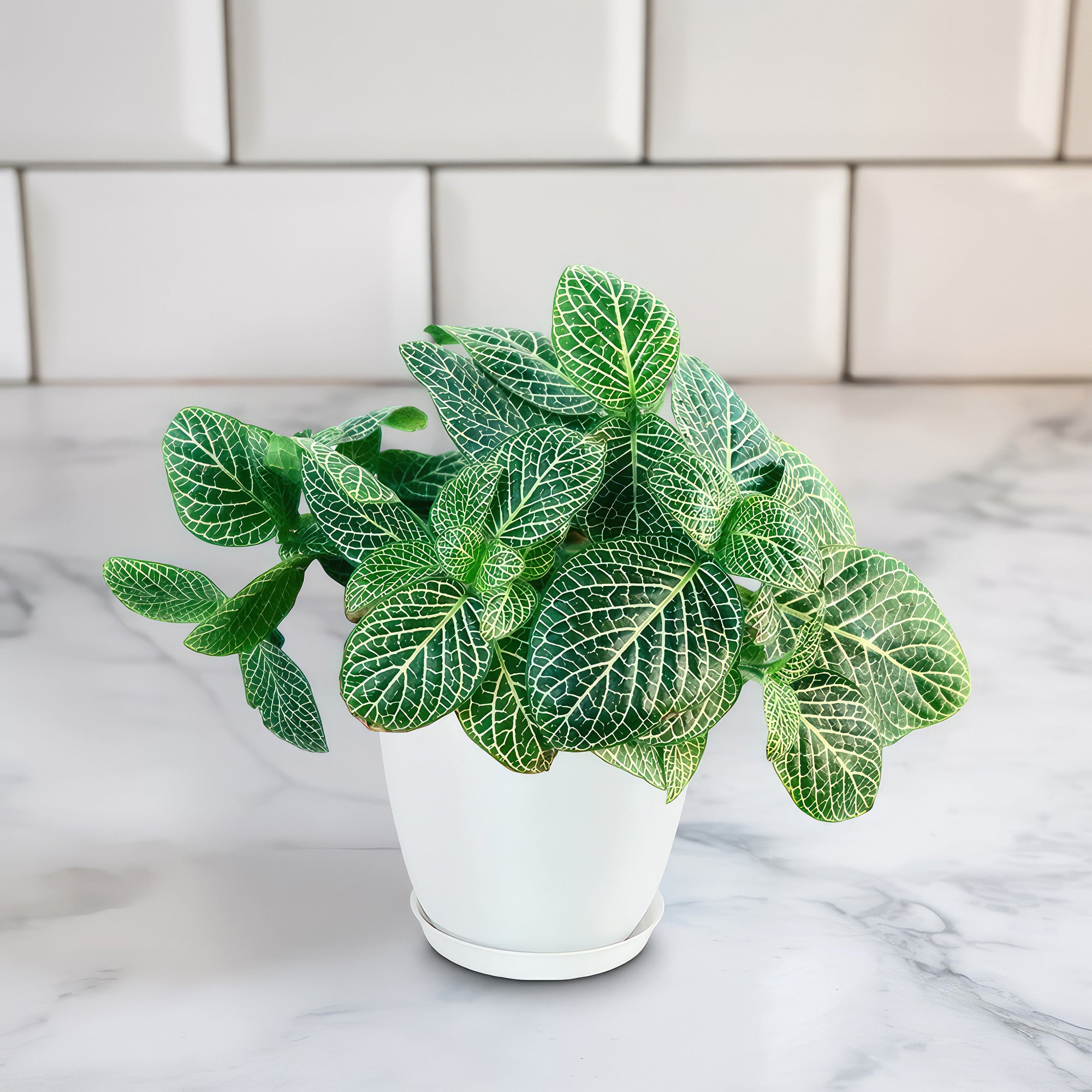
  2. The White Nerve Plant features deep green leaves with intricate white veining, creating a beautiful contrast that makes it a standout among houseplants.
  3. It works great in terrariums, hanging baskets, and as a groundcover in warm, humid environments, making it a flexible addition to various plant settings.
  4. It requires high humidity and indirect light to flourish, making it ideal for bathrooms, kitchens, and enclosed terrariums where moisture is retained.

The Nerve Plant, known as Fittonia ‘White Anne’, is an evergreen perennial plant admired for its intricate, vein-like patterns that run across its vibrant green foliage. This compact and low-growing species is often used as creeping ground cover in tropical garden or as an accent plant in decorative containers or terrariums alike.  

Its trailing habit makes it an excellent choice for hanging baskets or as a filler plant in mixed arrangements. Since this Fittonia hanging plant thrives in humid conditions, it is often found in enclosed environments like terrariums, bathrooms, and greenhouses, where moisture levels are consistently high.  

Native to the tropical rainforests of South America particularly Peru and Colombia, it remains relatively small, typically grow up to 8 inches tall with a spread of up to 18 inches wide.

The oval-shaped leaves of your nerve plants are soft and slightly wrinkled, showcasing bold bright white veins that contrast beautifully against the dark green leaf surface.

The color variations depend on the cultivar, with some varieties displaying pink nerve plant product, or even red nerve plant product veins.

Due to the delicate creeping stems, the nerve plant requires consistent moisture and indirect light to maintain its vibrant coloration.

The White Nerve plant’s flowers are typically small, inconspicuous, appearing as pale yellow to white spikes that emerge from the leaf nodes in the summer.

However, flowering is rare in indoor conditions, as the plant prefers high humidity and optimal tropical conditions to encourage blooming.  

Beyond its aesthetic appeal, most nerve plants, such as Fittonia albivenis, play a functional role in improving indoor air quality by filtering toxins.  

When and How to Water Your Nerve Plant 

A unique feature of the Nerve Plant is its dramatic response to underwatering. When deprived of moisture, this evergreen perennial wilts dramatically, appearing as if it is near death. However, with proper watering, it quickly revives, making it one of the most visually expressive houseplants.  

To water your nerve plant, check the soil by inserting your finger about an inch deep—if it feels dry, it’s time to water. Although Fittonia is a popular indoor plant, once established, it can tolerate drought conditions.  

During spring and summer, when it’s actively growing, keep the nerve plant’s soil evenly moist but not soggy to prevent root rot. Maintaining soil moist conditions is especially important when propagating nerve plants by cuttings to ensure successful rooting. Watering 2-3 times per week is generally sufficient, but in humid indoor environments, it may require less frequent watering since the moisture in the air helps keep it hydrated. Using filtered or room-temperature water is ideal to prevent stress on the plant. 

In fall and winter, during the dormant season, its growth slows, and it requires less frequent watering. Watering once every 1-2 weeks, or whenever the top two inches of soil feels dry, is recommended. Overwatering during dormancy can lead to root issues, so reducing frequency while maintaining some soil moisture is essential. 

Light Requirements – Where to Place Your Fittonia White

For indoors growing houseplants, place your nerve plant in bright, indirect light. It thrives with 6–8 hours of filtered sunlight or artificial grow lights.

Direct midday sun can scorch its delicate leaves, while too little light will result in leggy growth and faded leaf patterns of your dark green foliage.

A north or east-facing window is ideal or place it a few feet away from a bright south or west-facing window with sheer curtains.

When planting nerve plants outdoors, they partial to full shade and should be placed in an area that receives dappled sunlight for 4–6 hours a day.

If grown in a garden, keep it under trees, shrubs, or covered patios where harsh afternoon sun is blocked. In too much shade, your nerve plant may lose its vibrant colors, while direct sun exposure can cause leaf scorch and dehydration. 

Optimal Soil & Fertilizer Needs 

Fittonia nerve plants thrives in light, well-draining soil with high organic content. A mix of peat moss, perlite, and potting soil provides the ideal structure to retain moisture while preventing compaction. Maintaining the nerve plant's soil is crucial for its health, including proper watering practices, humidity control, and fertilization. A pH level between 6.0 and 7.0 is ideal for healthy growth. Ideally, you want to use our specialized potting mix, opens in a new tab that contains 5 natural substrates and organic mycorrhizae to promote the development of a strong root system that helps your white Fittonia to thrive. 

Fertilize during the growing season using a balanced, water-soluble NPK fertilizer with a ratio of 5-10-5, once a year in the spring. Dilute the fertilizer to half-strength to prevent overfeeding, which can cause leaf burn. Avoid fertilizing during the winter months, as the plant enters a dormant phase with slower growth. 

Hardiness Zones & More

When growing indoors as a houseplant, it requires stable temperatures between 65–80°F. It prefers high humidity levels above 50%, making it an excellent plant for terrariums and bathrooms. Keep it away from drafts, air conditioners, and heating vents, which can dry out the foliage.  

In the United States, this is mostly an indoor plant, but if you live in southern Florida or Hawaii then you can cultivate it outdoors in USDA zones 11-12, where temperatures stay warm year-round.

In high-humidity environments, Nerve Plants flourish under filtered light.   

If exposed to extreme heat, the leaves may become slightly paler, while cold temperatures might slow growth significantly.

For those outside these zones, it’s best to grow them as indoor plants or bring them inside when temperatures drop below 50°F.  

Wildlife – White Nerve Plant Flowers Attracts the Following Friendly Pollinators 

The nerve plant flowers attract a variety of friendly pollinators, including bees, butterflies, and hummingbirds. These pollinators play a crucial role in the reproduction of the plant and help to maintain biodiversity in the ecosystem.

Butterflies
Bees
Hummingbirds
Lady Bugs
Multi Pollinators
Other Birds

According to the ASPCA, Fittonia albivenis is non-toxic to humans, cats, dogs, and birds, making it a safe houseplant for pet owners. This plant, also known as nerve plant, thrives in humid environments and is a great option for adding a pop of color to any room.   

How to Propagate Your Fittonia Nerve Plant

You can easily do nerve plant propagation by taking stem cuttings. Make sure the cutting has at least two nodes and remove any leaves from the bottom half of the cutting before placing it in water or soil to root. Keep the cutting in a warm, humid environment with indirect sunlight until roots begin to form, then transplant into a well-draining potting mix. Water regularly and provide adequate humidity to help the new plant thrive.   

Pruning Nerve Plants 

Pruning is an essential aspect of nerve plant care, helping to maintain its shape and encourage bushy growth. Use clean scissors or pruning shears to trim back long stems and remove any dead or damaged leaves. Pinching off the tips of the stems will also help control the plant’s height and promote branching. Regular pruning not only keeps your nerve plant looking its best but also encourages healthy, vigorous growth. By incorporating pruning into your care routine, you can ensure your nerve plant remains a vibrant and attractive addition to your indoor garden. 

The Bottom Line 

Overall, the Nerve Plant (Fittonia White Anne) is a visually tropical houseplant known for its vibrant, veined leaves, and compact growth. Its stunning foliage and expressive nature make it a rewarding plant for both beginners and experienced plant lovers alike. Its non-toxic nature makes it a pet-friendly choice, and propagation is simple for those looking to expand their collection. With the right care—consistent moisture, bright light, and high humidity—it can thrive and remain an eye-catching feature in any dish garden or as a container plant. Order your very own Fittonia nerve plant for sale today! 

Shipping Notes
  • Free Standard Shipping on $100+ Orders to the USA.
  • Except Preorder products are shipped in 48 hours.
  • Delivery to the USA:
  1. Standard Shipping : 3-10 business days
  • If time is of the essence, please consider selecting expedited delivery for faster service.
Exchange/Return Notes
  • We offer a 30-day return/exchange service after receiving.
  • Final sale items are not eligible for returns or exchanges.
  • To process your return/exchange, please contact us at [email protected]
  • Please click here for more details>>> Return & Exchange Policy
SKU: 47595791545

Discover Niche Categories That Outsell can i use cactus soil for fittonia

Top-Converting Item to Boost Your Average Order

4.8 ★★★★★
Based on 11 reviews
Sort
Highest Rating
Newest First
Oldest First
Product Reviews
C
Verified Purchase
C H
Boise, US
★★★★★ 1
Eufy: Never Again
It is jaw-droppingly astonishing how AWFUL this thing is. I can deal with all the little problems: I have to pick up cords and small objects. It gets caught on random things and shuts down. It needs some creepy data-harvesting app that does nothing you couldn't do with a TV remote. I can live with all of this. Well, I'd like a robovac that doesn't need an app, because WHY do you need an app? It's pointless. But that's the way this world is, so I guess I have to deal with it. But what I can't handle is how BASIC FUNCTIONALITY does not work. It CANNOT KEEP A SCHEDULE! I have a very simple schedule: run every day at 10am. This device is completely and totally incapable of handling such a basic and simple task. Just run once a day, every day. I can worry about everything else. HOW DO YOU MESS UP A CLOCK? It forgets its ONE JOB every single week. I have to go back into the stupid app, re-set the schedule, probably re-set the map because it invented some new horrible map from the bizarro world because it randomly decided my house was actually NOT my house and it needed to re-establish what's up and what's down, and it got all of that wrong, so we have to go through the mapping process again. And that's if I'm lucky. Sometimes it decides to forget the wifi password (WHY DOES IT NEED WIFI????????) so I have to reconnect that too! And THIS IS EVERY WEEK! THIS IS BASIC FUNCTIONALITY! JUST! RUN! THE! PROGRAM! OH! MY! GOD! You had it right the first time! JUST DO THAT!!!!!!!! Alarm clocks have been doing this for 100 years now. Even before electricity, people could set alarms using candles or sand. How does an ELECTRONIC DEVICE with INTERNET ACCESS fail to know it's 10am and time to run? WHAT ARE YOU EVEN DOING? Normally I think people who type in all caps are crazy. But I am SO SO MAD I CANNOT TYPE NORMALLY. IT'S A CLOCK. LITERALLY JUST LOOK AT THE CLOCK. IT'S NOT DIFFICULT. LOOK. AT. THE. CLOCK. STOP. FORGETTING. MY. SCHEDULE. I don't know why I have bought 4 eufy robovacs. The first one was alright. It was one of their "dumb" vacuums that just bumps into walls. It eventually broke and they stopped selling the parts to fix it, so I bought a "new" (identical but more expensive) model which also eventually broke and they REFUSED to sell me the parts to fix it when it broke. So I bought one of these "smart" ones and it did this thing I'm describing here: forgot, EVERY WEEK, that it is just supposed to run once a day. IT'S NOT HARD. JUST RUN THE PROGRAM! So I wrote a 1 star review and they offered me a refund if I shipped it back in the original packaging. I threw that away so obviously that was not an option. So me in all of my abundant intelligence bought another, thinking it would be better. NOPE. THIS ONE DOES THE SAME THING! That's TWO entirely separate models, which are wholly incapable of ACTUALLY DOING THEIR ONE JOB IN THE WORLD. I should mention that the "dumb" models also had a nasty habit of running randomly at 3am and waking me up in a panic. I guess that should have been my first tip-off that this "tech" company cannot understand the single most basic technology of all of human history: time-keeping. So with 4 eufys under my belt I am extremely, EXTREMELY confident in my decision. Eufy: never again. I will not make this mistake again. I will scream it from the rooftops if I have to. I will tell all my friends. I will write it in the reviews. Never EVER buy eufy. Their vacuums cannot even do their ONE JOB. HOW HARD IS IT????
WAS THIS REVIEW HELPFUL?YesReportShare
Reviewed in the United States on February 2, 2026
G
Verified Purchase
Gambitzilla
Lowell, US
★★★★★ 5
Absolutely love Spazz!
I just received my robovac this afternoon, and let me tell ya: I already absolutely love it. I have named him Spazz, since the first time using him, he went in all sorts of seemingly random directions and was completely aggressive with ANYthing in his way. I'm talking full - bore, ram into it and push it. Then, as I realized, he was simply mapping his parameters and once he learned them (which didn't take long) he just did his thing and went right back to the charging station and rested. Here is my feedback: 1. I had a little trouble with the app. I tried logging in several different times with several different passwords and I kept getting a very cryptic message, that wasn't even complete! Just a quick flash on my screen and I cannot for the life of me tell you HOW I ended up finally logging in. But I did and will never log out. Ever. Just in case. 2. It took me a few tries (before I came to the conclusion that it was my error not the machine) to get Spazz to connect to the app. Little did I know that since the power station (some like it hot) is positioned relatively close to the Internet router already, I did not need to find it, but simply press the start/home buttons at the same time to reset the wifi and then connect to the app via bluetooth. 3. I am assuming Bluetooth always needs to be on in order to control Spazz, but at night when my phone is charging I'll turn it off and turn it back on in the morning. Not sure I like the idea of always having Bluetooth running since it is a battery drainer. 4. I also am not a fan of allowing ANY thing to use my location, except GPS, but alas, if I want to control Spazz remotely (this unit did not come with a remote, btw) I am at the mercy of this requirement. I also have outdoor cameras by the same company, so they know my location already anyway I suppose. 5. I like the suction Spazz has: he even picked up a sock that my boyfriend lacksidasically left on the floor. Which caused a red flashing error and the voice on the charging port yelled at me saying to clean the roller brush. So I flipped Spazz over and lo and behold, there was a sock halfway in and halfway out of the roller brush. Pulled it out and good as new. So, suction is AMAZING. 6. Speaking of suction, he does a great job of getting up dog hair. I have 2 dogs, one with very thin hair and the other with a wiry undercoat and it is all gone within the cleaning time. 7. And touching on that aspect, it really doesn't take THAT long. Yes, it takes longer than I do BUT I also do not go in any kind of pattern like Spazz NOR do I go over the same area more than once. In essence, he is cleaning my floors better than I do and I'm kinda ticked about it. 8. The fact that I can control how much suction he has using the app is great. Even though he features a BoostIQ, changing the suction depending on the material, I still like that I can get a more thorough cleaning using MAX. Does it use more battery? Yes. Does it clean more? Perhaps. Does it make me FEEL like it's cleaning more? Absolutely. 9. The mapping accuracy is indeed, well, accurate. I moved him upstairs to do my two bedrooms and the hallway and at first he was like, 'uhhhh I haven't been here yet. What's going on? Where am I? Who are you?!' but then he settled down and mapped out the areas just fine and went along his merry way. 10. I have to de-snag him from cords every once in awhile and give him a little nudge transitioning from the downstairs hallway to the bathroom, but honestly once he learns his map, he avoids such obstacles and has even figured out how to get over the hump from the threshold in the bathroom. Basically lifts up and scales it like he's climbing Mt. Everest, which to him, may seem like it. 11. I like the fact that he empties himself and any hair caught on the brush is quickly razored away when he goes home. Yes it's a bit noisy but it's only for a minute and I'll take that over needing to manually pull hair out like I have to in my regular vacuum. Not getting my hands all gross is a huge plus. And it really doesn't seem like there is anything tangled in it anyway. I have long hair but I'm pretty adamant about getting it thrown away even though I know there's some strands about. 12. Spazz's functionality is top - notch. Nothing has gone wrong, other than the few things with the app connection and the wayward sock incident, as it is now known as. 13. The dogs do not seem to be bothered by him at all, just curious as to what this new thing is in their space and my male quickly dis-trusted Spazz to NOT suck up his favourite bone so he snaggled it up and went to another room. My female watched Spazz very intently, just in case he may actually have legs and feet and scurry away. Thankfully she did not try to bite him like she does with my regular vacuum! 14. I have a robot trash can (motion sensour) in my kitchen and Spazz knocked into it while mapping and I told him 'that is another robot. There better not be any interaction between the two of you and don't even think about communicating.' Only time will tell what transpires between them. If we don't turn up for awhile, do a wellness check. If there's a putrid odour, but the floors are clean and the garbage has been taken out, just know humanity has lost. For everyone complaining it is not immediately perfect right out the box: there IS a manual on line. Read it. Study it. Learn it. Embrace it. If you cannot find the time to actually READ something, watch a video since most people believe that because you watched a 3 minute video, you're automatically brilliant and know everything about it. It will never be perfect in any way, shape or form. Remember, computers are only as smart as the person using them. Take some time to get to know your machine and HAVE PATIENCE!!
WAS THIS REVIEW HELPFUL?YesReportShare
Reviewed in the United States on November 1, 2024
J
Verified Purchase
Jens Haselhuhn
Lexington, US
★★★★★ 4
Review after a year of use
So i had this Vacuum for a little over a year, and i am happy with it, but in the past couple of months some issues showed up / or where kind of present the whole time because of how it works... - Its gonna find everything, and its gonna eat everything: Cables on Floors in general, behind couches, or behind sideboards, corners of lightweight carpets - gonna get stuck in the brush or robot looses contact to the floor with wheels (f.e. behind media sideboards)...you have to make sure nothing is on the floors where it could get stuck, even shoes are sometimes difficult for it. - Under Couch issue (all the time issue): the Lidar Sensor is on top of the robot (highest point) If you have a couch where the fabric underneath hangs a little down, the robot goes there but gets stuck because the Lidar sensor cant see anything, because the fabric hangs down on it. And im not talking ripped fabric - its just bulging down a little but thats enough in my case to cover the Sensor and its just sitting down there - spinning and turning, until i get under the couch and push the fabric up a little... - Battery Runtime (all the time issue): I have aprox. 1400sqft living space under AC - it needs up to 1-2 battery charges on "standard mode" to clean all floors 1x. - Corner or Edge Cleaning brush (showed up after aprox 11 months): starts to squeak sometimes really loud. Since i changed them regularly as recommended, i made sure its always clean beneath the brush and the mount, so no hair or any other debris down there. - It has problems with sliding doors (all the time issue): scans trough the doors and wants do go there but cant of course. You have to go into the app and draw a line close to sliding doors so it doesn't try to go there.... - Biggest inconvenience (showed up after 12 months): it happens to me almost every time after a clean, It drives back onto the base station - and it feels like the charging Pins either on the base or on the robot, lose contact, and the robot just discharges and next time you want to use it (f.e next day), its Batteries are empty, and you have to try turn it back on (with empty batteries) and wait for it to charge up. i cleaned both pins on the base station and the contact surfaces on the robot (no, no protective plastic strips on pins or contacts) but it doesn't really seem to help. - Sometimes the app / Robot looses Maps (sporadically): The first thing is a mapping. Robot drives around and scans the whole area - splits the map into different rooms. You can adjust this Rooms and "No go zones" via the app. Sometimes those maps inside the app go "bye bye" and you have to do it all over again. Other than that its a very nice robot and it does its thing.
WAS THIS REVIEW HELPFUL?YesReportShare
Reviewed in the United States on December 14, 2025
A
Verified Purchase
Aubastew
Houston, US
★★★★★ 2
App/Vacuum Loses maps after 3 months of use.
I'm hoping someone from Eufy is monitoring these reviews. We love...loved our Eufy. It works great. The mapping and map editing is so nice to be able to program the vacuum to clean different rooms each day. We love the self cleaning system that empties the Eufy after each use. We owned a Roomba a few years ago with the self empty option and it never worked. We had it replaced by Roomba twice and it still never worked. This one works exceptionally well. BUT here we are 3 months later and the app is losing the map. nearly every day, the system has to re-map our entire space. Yesterday, it had no map and went down the stairs. The unit is supposed to have a sensor to prevent it from going where there are drop offs but apparently this issue with the mapping is also showing up in the unit being unable to stay in the cleaning area. I'm hoping that someone from Eufy will reach out to help. Thanks,
WAS THIS REVIEW HELPFUL?YesReportShare
Reviewed in the United States on May 12, 2026
A
Verified Purchase
Amazon Customer
Draper, US
★★★★★ 5
Quiet, that's about the only good quality
UPDATE: Moving to 5 stars! Quickly after my 2 star review (below) the seller reached out and askked to exchange the defective product for an upgraded model at no cost to me. They were attentive and quick in responding, and I received a replacement version that also included the mopping functionality (The first didn't have this), and it works as expected. Customer service was too notch. I wouldn't hesitate to buy again. This is a lot quieter than my original Roomba, that is still running strong...but I wanted a 2nd robot vac so I could run one on the main floor and 2nd floor of my home. This one doesn't fit the bill, and I will be returning. I ran it while I was at home, and it stopped 4 times, telling me I needed to clean the brush. There was absolutely nothing bound on the brush any of the times. But had I not been home, it wouldn't have finished cleaning because it stops completely when it thinks there is hair. Then, another time, it just stopped running. It didn't say anything, so I don't know why it stopped. I assume it thought it was done, but the whole level of my home wasn't finished. This was all in just the one time I attempted to run it for 1 cycle. When I pushed the start button again, it said something to the effect of starting cleaning, so that's what makes me assume the last cycle was over. It does clean well, and is very quiet; however, it just stops for no reason far too often. I want it to run while I'm at the office, which obviously won't work if I have to be here babysitting it for the imaginary dirt on the brush. This will unfortunately be getting returned. I think I'll stick to the Roomba brand, as I have far less issues with my 10+ year old vac than this new one with all the nice features.
WAS THIS REVIEW HELPFUL?YesReportShare
Reviewed in the United States on March 4, 2025

recommand products