SKU: 6157846632
in california who grows philodendron hope

in california who grows philodendron hope Philodendron Hope

Sale price$23.51 Regular price$26.12
Save 10%

Pay in installments of $6.53 with ShopPay, AfterPay and Klarna

Shipping Estimate
USA
  • USA
  • CAN

Ships within 48 hours · Estimated delivery Nov 26 - Dec 1

Promo Codes Available:

For Your Every Summer RSVP, with Code: SUMMER15

Description

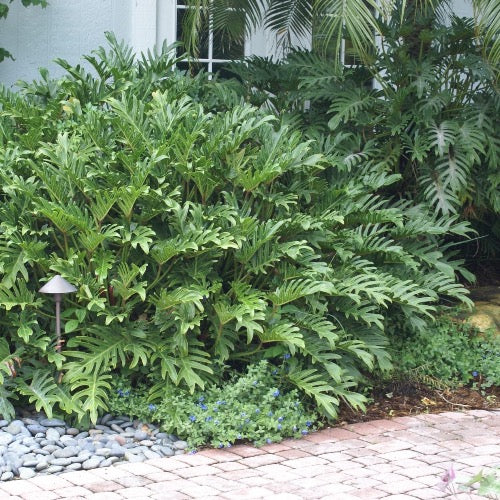
in california who grows philodendron hope Philodendron HopePhilodendron Hope The easy care Hope philodendron is a split leaf philodendron variety that only grows to 4 feet an ideal tropical accent for any size South Florida yard. This is one plant that needs no fussing over. Thriving in sun or shade, Hope is a versatile garden addition that can set off ho hum landscaping with the lush look of the tropics. Hope is a moderate grower for sun or shade, though it's happiest in areas of part sun to part shade. It

Philodendron Hope

The easy-care Hope philodendron is a split leaf philodendron variety that only grows to 4 feet - an ideal tropical accent for any size South Florida yard.

This is one plant that needs no fussing over. Thriving in sun or shade, Hope is a versatile garden addition that can set off ho-hum landscaping with the lush look of the tropics. 

  • Hope is a moderate grower for sun or shade, though it's happiest in areas of part sun to part shade. It can get about 4 feet tall by 4 feet wide.
  • This plant does best in Zone 10. In Zone 9B you can keep it in a container and bring it indoors during cold weather.
  • Not too big, not too small, this plant doesn't climb like some philodendron varieties.
  • Philodendrons contain toxins - handling leaves and stems can cause skin irritations in some people, so if you're sensitive to these things, wear gloves.


      Advantages:

      Easy To Grow

      Low Maintenance

      Great For Shaded Areas

      Grows To Cover Larger Area

      Grow Best: 

        Landscape

        House Plant

      Container


      Ideal position:

      Performs best in Sun Light

      Any light is fine.

      Sun: full to part Sun, 6 plus hours direct sun daily


      Water: 

      Once a week, or when top inch of soil is dry, they are not as thirsty as many other common houseplants, but will drop leaves if they stay too wet or too dry for extended periods


      Healthy Temperatures:

      Warm, tropical vibes of 65-90°F

      Grown indoors as a houseplant but can be grown outdoors in USDA Hardiness Zones 2-12


      Growth Outlook:

      Variegated ginger is a moderate grower that can reach heights of 3 to 4 feet, and grows 3 to 4 feet wide.

       Growth Rate: Fast


      Pet Friendly - NO

      NO. The philodendron family, which includes Swiss cheese plant, heartleaf and fiddle-leaf philodendron, have a toxicity level of mild to moderate for cats and dogs. Oral irritation, pain and swelling of mouth, tongue and lips, excessive drooling, vomiting, difficulty swallowing.


      Qualifies For Free Delivery

      Landscape uses for Philodendron Hope

      • Accent in a mixed bed 
      • Filler plant for a garden corner 
      • Along a deck or patio 
      • In a pool cage planter (in an area that won't get splashed) 
      • Between palm trunks
      • Entryway accent
      • Large, full plant for the corner of the house
      • Under tall trees
      • Container plant


      Plant care

      Add top soil or organic peat humus, mixed together with composted cow manure, to the hole when you plant.

      Choose a well-drained area that doesn't stay overly wet or any philodendron will rot from too much moisture.

      Water regularly but allow enough time for the plant to dry out a bit between waterings.

      The only need for trimming a Hope philodendron is to remove a dead leaf or stem occasionally.

      This is not a plant that should be cut back for size. Doing this is pretty much futile because of the way a philodendron grows (and doing so will spoil its good looks) so planning for ultimate size is important.

      Fertilize 3 times a year - once each in spring, summer and fall - with a good quality granular fertilizer.

      Plant spacing

      Plant 3 or 4 feet apart. Come out from the house 3 feet.

      If you're planting near a walk or drive, come in at least 3 feet (more if you can) to give the plant room to grow wide without getting in the way.

      Allow enough room between Hope and the plants near it...the large leaves may overlap other, smaller plants once the philodendron has begun to mature.

      This is a very good plant for large containers - great for balconies, patios, even indoors.

          Shipping Notes
          • Free Standard Shipping on $100+ Orders to the USA.
          • Except Preorder products are shipped in 48 hours.
          • Delivery to the USA:
          1. Standard Shipping : 3-10 business days
          • If time is of the essence, please consider selecting expedited delivery for faster service.
          Exchange/Return Notes
          • We offer a 30-day return/exchange service after receiving.
          • Final sale items are not eligible for returns or exchanges.
          • To process your return/exchange, please contact us at [email protected]
          • Please click here for more details>>> Return & Exchange Policy
          SKU: 6157846632

          Discover Niche Categories That Outsell in california who grows philodendron hope

          Top-Converting Item to Boost Your Average Order

          4.7 ★★★★★
          Based on 9 reviews
          Sort
          Highest Rating
          Newest First
          Oldest First
          Product Reviews
          H
          Verified Purchase
          Hamid Ahmad
          Charlottesville, US
          ★★★★★ 1
          Not a good choice.
          Style: WF-4820, Set: 1. SINGLE TRAY (250 sheets)/FAX/ADF/PRINT/COPY/SCAN
          I recently purchased this printer with high hopes of a reliable and efficient printing solution. Unfortunately, my experience with this printer has been nothing short of a nightmare. Connectivity Woes: The most glaring issue is its abysmal Wi-Fi connectivity. Despite being placed right next to the router, the printer consistently displays a "Poor Wi-Fi Connection" message. This is in stark contrast to all other devices in my home, which work seamlessly with the Wi-Fi network. Even my old laser printer, which is placed close to the same location, functions without any connectivity hiccups. It's baffling how a modern printer can struggle so much to maintain a stable Wi-Fi connection. Scanning Nightmares: The scanning functionality of this printer is equally disappointing. The user interface is far from user-friendly, making it a daunting task to set up scanning to email or computer directly from the printer. This is a basic feature that should be intuitive and hassle-free, but instead, it's a convoluted process that requires unnecessary effort and time. Ineffective Customer Service: I reached out to customer service in hopes of resolving these issues. While they guided me through a reset process, the solutions they provided were only temporary fixes. The problems resurfaced shortly after, leaving me back at square one. It's frustrating to invest in a product only to find that the customer service solutions are inadequate and short-lived. Comparative Performance: What's more perplexing is that my older laser printer, which is from a different brand, continues to perform flawlessly in terms of connectivity and scanning capabilities. This stark contrast highlights the subpar quality of the Epson. Final Verdict: I'm deeply disappointed with this printer and regret this purchase immensely. Its inability to maintain a stable Wi-Fi connection, along with the cumbersome scanning setup and unsatisfactory customer service experience, make this printer a headache rather than a helpful device. I strongly advise against considering this printer if you value reliable performance and user-friendly features. Save yourself the frustration and explore more dependable options on the market.
          WAS THIS REVIEW HELPFUL?YesReportShare
          Reviewed in the United States on August 10, 2023
          S
          Verified Purchase
          Scott V
          West Palm Beach, US
          ★★★★★ 5
          Easy set up on USB cable. Works as expected on my Windows 11 computer
          Style: WF-4820, Set: 1. SINGLE TRAY (250 sheets)/FAX/ADF/PRINT/COPY/SCAN
          I got this Epson All-In-One printer for my work. I had been using HP printers for years. I started having problems with paper handling on them. Things like getting a paper jam error when there was not paper jammed in it. I decided to try an Epson for a change. I have had the printer now for three weeks. So far it has worked great. Easy to set up on my Windws 11 computer. Works great for printing and for scanning. I have it set up by USB cable because I don't have reliable wireless internet in that part of the building. No issues with the USB configuration. Ink usage seems good so far. Ink on any printer is expensive, but that was expected. I would recommend this printer.
          WAS THIS REVIEW HELPFUL?YesReportShare
          Reviewed in the United States on March 28, 2026
          U
          Verified Purchase
          user x
          Battle Creek, US
          ★★★★★ 4
          Much harder to install than expected - especially if you have a comma in your Wifi password
          Style: WF-4820, Set: 1. SINGLE TRAY (250 sheets)/FAX/ADF/PRINT/COPY/SCAN
          I found this printer surprisingly hard to install. First, I used the software on the DVD that came with the system. That caused my computer to crash and reboot! After it rebooted, I downloaded the (presumably newer) combo installer from the Epson web site. That ran, but when it came time to connect the printer to the wifi network, I found that there is no way in the Epson network configuration wizard to use a comma in the wifi password. There is a period and many other symbols, but I didn't see a comma. But our system admin used a comma in our wifi password, so I couldn't connect the printer to the wireless network. I had to dig up a LAN cable and plug the printer into a network switch, restart the installation and configure the printer for a LAN connection. That seemed to work, at least according to the installer, but when I tried to print a test page there was a print connection failure. After running the "Epson Printer Connection Checker", it found a printer port error and tried to fix it, but was unable to. So, I removed the printer entirely from the computer using Windows device management and had Windows try to detect the printer. That finally worked, although now the Fax device is missing. But at least now I can print, and the print quality looks good. But I'm still frustrated by the inability to connect to the wifi.
          WAS THIS REVIEW HELPFUL?YesReportShare
          Reviewed in the United States on April 10, 2023
          A
          Verified Purchase
          Albert
          West Palm Beach, US
          ★★★★★ 5
          Great printer
          Style: WF-4820, Set: 1. SINGLE TRAY (250 sheets)/FAX/ADF/PRINT/COPY/SCAN
          This printer is compatible with my Apple Mi 4 desktop and my Apple Laptop. I didn’t have a dvd player, so I went to the required Epsom website, and downloaded the software. No issues. All of the bells and whistles on the printer works flawless. Follow the directions and enjoy the results .
          WAS THIS REVIEW HELPFUL?YesReportShare
          Reviewed in the United States on April 17, 2026
          B
          Verified Purchase
          BM
          Alexandria, US
          ★★★★★ 5
          Best for Business owners gets the Job done
          Style: WF-4820, Set: 1. SINGLE TRAY (250 sheets)/FAX/ADF/PRINT/COPY/SCAN
          This Item is outstanding. Why? I've had two HP printers all in ones however, they were okay and did the job the inks are very expensive and not worth the money quite frankly. Now this printer faxes very fast and prints very fast also holds twice the paper in its tray. I like the big readable screen display that's really an asset. The HP always a hard time with big hands to enter numbers into the printer to fax,dial, and configure. This primer comes with the CD ROM if needed. Out of the box set up was indeed a breeze. Ready to go. I was really impressed to say the least. My personal opinion is that I highly recommend this item for small business owners who like to get the job done and quickly. Respectfully Dr. Martin PhD
          WAS THIS REVIEW HELPFUL?YesReportShare
          Reviewed in the United States on September 21, 2025

          recommand products