SKU: 97760468260
san pedro cactus latin name

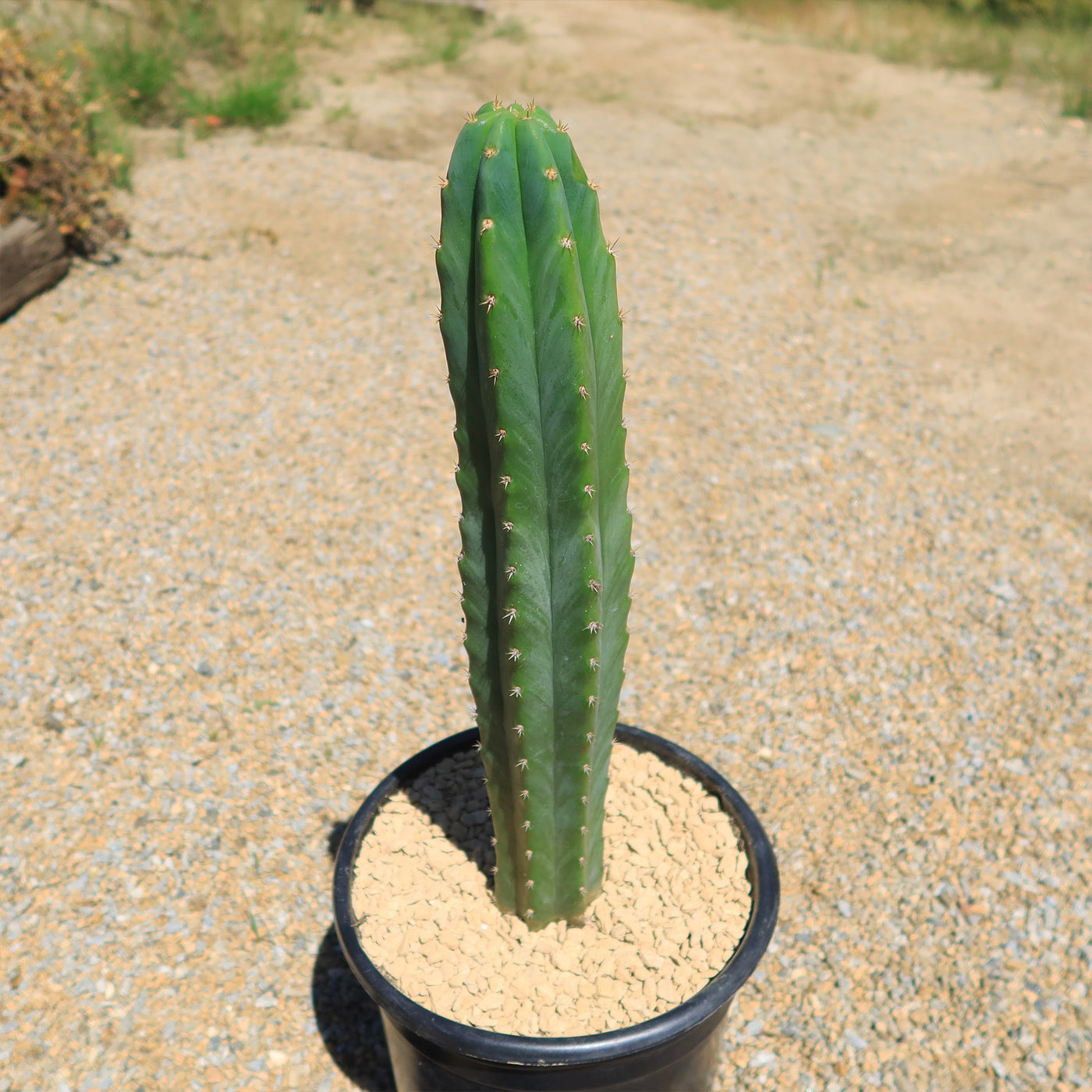
san pedro cactus latin name San Pedro Cactus 'Echinopsis pachanoi'

Sale price$18.12 Regular price$20.13
Save 10%

Pay in installments of $5.03 with ShopPay, AfterPay and Klarna

Shipping Estimate
USA
  • USA
  • CAN

Ships within 48 hours · Estimated delivery Nov 26 - Dec 1

Promo Codes Available:

For Your Every Summer RSVP, with Code: SUMMER15

Description

san pedro cactus latin name San Pedro Cactus 'Echinopsis pachanoi'Introducing the San Pedro cactus, also known as Echinopsis pachanoi (Syn. Trichocereus pachanoi) or Trichocereus Echinopsis pachanoi, which is among the superstars of the cactus world. This fast growing columnar cactus is also known as the Wachuma and Huachuma. Standing tall and proud, this magnificent San Pedro cactus columnar beauty can reach heights of up to 20 feet and spread its branches wide, up to six feet! With stems that range from vibrant

Introducing the San Pedro cactus, also known as Echinopsis pachanoi (Syn. Trichocereus pachanoi) or Trichocereus Echinopsis pachanoi, which is among the superstars of the cactus world. This fast-growing columnar cactus is also known as the Wachuma and Huachuma. 

Standing tall and proud, this magnificent San Pedro cactus columnar beauty can reach heights of up to 20 feet and spread its branches wide, up to six feet! With stems that range from vibrant green to mesmerizing blue-green shades, San Pedro is a true showstopper in any landscape. As your San Pedro cactus plant matures, its colors deepen and intensify, adding even more charm to its already captivating presence.  


When the San Pedro cactus flowers bloom, they emit a sweet fragrance that attracts pollinators like bees and butterflies.

The flowers are usually large and trumpet-shaped and come in various colors, including white, cream, and yellow. The petals have a delicate texture and often have a waxy appearance.

The fragrant flowers usually open during the day and close at night. They have a short blooming period, typically lasting for a day or two.

During the blooming season, which usually occurs in late spring or early summer, multiple flowers can bloom at once, creating a captivating sight.

The San Pedro cactus flowers are not only visually appealing but also have cultural significance. In some indigenous cultures, the flowers are used in traditional ceremonies and rituals. They are believed to have spiritual and healing properties.

The San Pedro cactus also has Pitahaya red San Pedro cactus fruits. These fruits are known for their sweet and refreshing flavor, making them a popular choice for consumption. Additionally, they are rich in antioxidants and vitamins, providing numerous health benefits.  

When and How to Water Your San Pedro Cactus 

San Pedro cactus is a drought-tolerant plant that can survive in dry conditions for long periods of time. However, regular watering is still needed to stay healthy. Generally, the San Pedro needs to be watered once every two weeks. During the summer months, when temperatures are high and the plant is actively growing, it may need to be watered more frequently.  

When watering your Trichocereus Echinopsis pachanoi, be sure to soak the soil thoroughly and allow it to drain completely. To prevent root rot and other issues, avoid overwatering. The leaves may become dry and brittle, and the cactus may stop growing if it is underwater. Over time, the San Pedro cacti may start to lose their shape and become misshapen.  

In addition to these physical symptoms, underwatering can also make the cactus more susceptible to pests and diseases. To keep your San Pedro cactus healthy and thriving, it is important to water it regularly and provide it with the right growing conditions. 

Light Requirements - Where to Place Your San Pedro Cactus

When grown indoors, your San Pedro cactus should be placed in a bright, sunny location where it can receive at least six hours of direct sunlight each day.

For outdoor cultivation, the San Pedro cactus requires a lot of sunlight to grow and thrive.

In its natural habitat, this cactus is exposed to direct sunlight for 4-6 hours each day.

If you live in an area with a lot of cloud cover or limited sunlight, you may need to supplement your cactus's light with artificial grow lights.

So, let's give your San Pedro cactus plant what it deserves—just the right amount of light to bloom into the ultimate showstopper! 

But beware; too much sun can lead to burns, so make sure you gradually increase exposure or bring it indoors during a heatwave. And if your Echinopsis pachanoi isn't getting enough light, it'll start stretching toward its source.

Optimal Soil & Fertilizer Needs 

Use well-drained soil that is designed specifically for your Echinopsis pachanoi cactus. These specialty soil mixes have been precisely developed to imitate well-draining desert soils. Commercial cactus soil is affordable and available online or at Home Depot.

Planet Desert specializes in cacti and has a specialty cactus potting mix that contains 5 natural substrates and organic mycorrhizae to promote the development of a strong root system that helps your San Pedro cactus thrive. 

When it comes to fertilizing your San Pedro cactus plant, it only needs a small amount of fertilizer applied once a year in the spring. Cacti prefer fertilizer with lower doses of NPK, with a maximum ratio of 5-10-5 which is higher in phosphorus than nitrogen. Remember, overfertilization can lead to root rot or even the death of the plant, so be cautious! 

Hardiness Zones & More 

San Pedro cactus is a hardy plant that can grow in a variety of different climates. It is native to the Andes Mountains, where it can be found growing at high altitudes in a range of temperatures. In the United States, San Pedro cactus is typically grown in warm, dry climates such as those found in the southwestern states. 

When growing indoors, the San Pedro cactus prefers a warm and dry environment. It thrives in temperatures ranging from 55°F to 75°F. Aim for a humidity level of around 40% to 50% to create an ideal indoor environment for your San Pedro cactus.

For outdoor cultivation, this cactus is hardy in USDA zones 8–11, which means that it can tolerate temperatures as low as 20 degrees Fahrenheit.

If you live in an area with extreme temperatures, you may need to take extra precautions to ensure that your San Pedro cactus Echinopsis pachanoi, stays healthy. 

In addition to its hardiness zone, it is also important to consider the humidity requirements of the San Pedro cactus. This cactus is adapted to dry, arid environments and does not require a lot of humidity to grow. In fact, high levels of humidity can be detrimental to the health of the plant, as they can promote the growth of mold and fungal diseases. 

When growing San Pedro cactus, it is important to provide good air circulation and avoid overwatering to prevent the buildup of excess moisture around the base of the plant.

Wildlife - San Pedro Cactus Attracts the Following Friendly Pollinators

The San Pedro Cactus flowers attract several friendly pollinators such as bees, butterflies, and hummingbirds. These pollinators are essential for the reproduction of the cactus and play a crucial role in maintaining the ecosystem's biodiversity.

Butterflies
Bees
Hummingbirds
Lady Bugs
Multi Pollinators
Other Birds

According to ASPCA, the San Pedro Cactus is safe for humans but can be mildly toxic to cats and dogs if ingested in a large amount. However, it is safe to touch and handle, making it a popular choice for ornamental cactus gardens. However, it is important to keep San Pedro Cactus out of reach of pets to prevent accidental ingestion.

How to Propagate Your San Pedro Cactus

Propagating the San Pedro cactus can be done through seeds or cuttings, but each method has its pros and cons. While cuttings are a quicker option, this method involves cutting off the top of the plant, which permanently alters its tall, elegant columnar form. For this reason, propagation by cuttings is only recommended if the plant has already broken or been damaged. In such cases, you can take a healthy segment, allow it to be callous for about a week, and plant it in well-draining soil to root. However, this approach is less ideal for those who wish to maintain the plant's natural aesthetics.

Seed propagation is a method for cultivating new cacti plants, and preserving their beauty. Harvested from mature cacti's fruit, seeds are cleaned, dried, and sown onto a well-draining soil mix. Despite the patience required, this method allows for healthy plants without compromising the parent cactus's appearance, despite the need for indirect sunlight or grow light.

Key Takeaways

  1. Unlike many other cacti, the San Pedro grows quickly, often reaching heights of 10–20 feet under ideal conditions, making it a popular choice for ornamental gardens.
  2. This cactus is highly adaptable, thriving in a variety of climates and requiring minimal care. It is drought-tolerant, hardy in USDA zones 8–11, and grows well in nutrient-rich, well-draining soil.
  3. San Pedro Cactus is a drought-tolerant that thrives in arid conditions and requires minimal watering. It is a popular choice for xeriscaping and landscaping in dry climates due to its ability to store water in its fleshy stems.

Final Thoughts

Overall, the San Pedro cactus (Echinopsis pachanoi) is a remarkable plant with unique features. It is characterized by its tall, columnar shape and beautiful white or yellow flowers. The cactus can grow to impressive heights, reaching up to 20 feet in optimal conditions. Its spines are relatively short and are arranged in clusters along the ridges of the cactus. The San Pedro cactus is a low-maintenance plant that thrives in well-draining potting soil and enjoys ample sunlight. It prefers a dry environment and can tolerate drought, so it should be watered sparingly, allowing the soil to dry out between waterings.

Don't miss out on this opportunity to add something truly exceptional to your garden. Buy San Pedro cactus for sale today to enhance your collection! 

Shipping Notes
  • Free Standard Shipping on $100+ Orders to the USA.
  • Except Preorder products are shipped in 48 hours.
  • Delivery to the USA:
  1. Standard Shipping : 3-10 business days
  • If time is of the essence, please consider selecting expedited delivery for faster service.
Exchange/Return Notes
  • We offer a 30-day return/exchange service after receiving.
  • Final sale items are not eligible for returns or exchanges.
  • To process your return/exchange, please contact us at [email protected]
  • Please click here for more details>>> Return & Exchange Policy
SKU: 97760468260

Discover Niche Categories That Outsell san pedro cactus latin name

Top-Converting Item to Boost Your Average Order

4.6 ★★★★★
Based on 29 reviews
Sort
Highest Rating
Newest First
Oldest First
Product Reviews
R
Verified Purchase
Robert O. Forsyth Jr.
Port Orchard, US
★★★★★ 1
JUNK, Cheaply built, Feed Scanner fails and falls apart in less than 5 months and only 4 uses.
Style: ET-4800, Color: White, Set: FAX/ADF/Print/Copy/Scan, Style: ET-4800, Color: White, Set: FAX/ADF/Print/Copy/Scan
Absolute piece of Junk! Built cheaply. Feed Scanner has never worked properly from my first scan (only did 4) and now falls apart completely, in the roller section. It falls out after it jammed for the 7th time today, this time with a SINGLE piece of paper. If you have a piece of paper that has a fold in it, forget about it. That will never feed through. I had 6 sheets I had to get out today, I had to do manually via the flat bed, both sides. It took 23 minutes to get done. Should not have taken 2. The last time I used it same issues but less sheets. The paper is SO TIGHT in the feed section it is hitting BOTH walls. You could not slip a piece of paper in there if you wanted too, most likely one of the reasons it does not feed correctly. While on the phone with support (I am right now, 4th call today and 3 emails of pictures they wanted later, the hoops they put you through is ridiculous!) Of course overseas support and has little to no knowledge of being Tech support, I asked for supervisors only to have my first call disconnect at 1 hour and 20 seconds. Then the next call was 24 minutes, then another 32 minutes and now this one still ongoing (56 minutes and still going). Now after 3 hours and 5 minutes, they are "holding" my credit card for 179.99 + tax to get a REFURB unit! So much for a 5 year Warranty. Oh they acted like it was out of date on Warranty, it has NOT been in EXISTENCE for 5 years , it came out in 2022. Did I fail to mention you WILL be dealing with Overseas people who have you repeat the same thing over and over and over and over again. They wonder why I was getting upset...hmmmm . As they pass you along the ranks you have to repeat EVERYTHING all over again. As I was on the phone and they were asking me to open WRONG doors to find the serial #, I lifted once again the Jam area and guess what, the parts fell out. Just PLOP! Other issues while I am at it, the Picture quality is "OK" nothing special. I bought it to save ink as HP gouges you to death and destroys your print head if you use a knockoff. The Ink has been "OK", but I haven't really had it long enough to tell as most everything has been Black and White, so all are still full except the Black (3.4's). Its a rear feed, I miss the HP draw on that, the print speed again is not fast, just OK. Though never really in a rush with it. I cant say it enough, this is cheaply built, and my experience with Tech Support was a HORRIFIC. I never like dealing with Over seas support as it is, but what they wanted pictures of as proof was mind blowing (pictures of the tubes that go to the ink wells? What does that have to do with the issue at hand.) The panel function is anything but user friendly. Firmware Updates, if not done, will prevent usage until done. You have to download and install ALMOST 30 different files, from drivers to firmware updates the list is endless. Never have I had to do that many of ALL printers I have had combined. Simple ZIP file and let it run on an executable file (EXE)like everyone else. That will take you over 2 hours to get all loaded. The ink wasn't bad seeing it needs to be primed first to work, I am not sure what will happen when the REFURB comes, will I get ink or just have to re-prime from the cartridges. The software for scanning is easy to use, though unnecessary, should just scan and auto save, or am I just spoiled by HP? But to send me a "REFURB" as a replacement on a 5 month old unit with a 5 year warranty is really being low. They did EVERYTHING they could to get me to NOT follow through in this return, you have ONLY 30 days on Amazon. You have been warned, I would look elsewhere, the tank issue is a great Idea, but if it doesn't work, what good does it do.
WAS THIS REVIEW HELPFUL?YesReportShare
Reviewed in the United States on December 8, 2025
M
Verified Purchase
Michael A. Adkins
West Palm Beach, US
★★★★★ 5
First Impressions - Complete Review
Style: ET-4800, Color: White, Set: FAX/ADF/Print/Copy/Scan, Style: ET-4800, Color: White, Set: FAX/ADF/Print/Copy/Scan
Printer Review from an Artist. Printer cost with a 3-year extended warranty - $199.00. Came with four full bottles of Ink. Each bottle was huge, and enough to completely fill up the tanks. In my old Epson printer that used Epson 127 Ink Cartridges a cartridge held 8ml of ink. The cost per cartridge for the XL Black was $31.00 on Amazon. In comparison, a bottle of ink for the tank printer costs $15.00 and holds 65ml. The Epson 127 Ink Cartridge is rated at 175 pages for the XL cartridge and the Tank Printer is rated at 4500 pages per bottle of ink. So, the difference in cost is striking. Unboxing the printer was simple enough. The printer weighs about half the weight of my old Epson printer. The new printer does not have printer drawers but, back feed only. This actually worked out well for me since I was constantly taking the paper in out and out of the drawers when changing paper size. Also, with this direct paper feed, I figure it will handle my heavier weight card stock paper that I use for my art and greeting cards. To my great surprise, the printer offers two-sided printing. This is really handy when printing my Zines. The printer setup was extremely easy as they recommend a phone app, that walks you through each step with pictures. And it communicated perfectly with the phone for the setup. It takes about 15 minutes to completely set up the printer. I have learned to not rush setup. Take your time, and follow the instructions step by step, Which include filling the tanks. Features, * The printer dues Dual-Sided Print - Great for zines. * It has fax capability, but we do not have a landline, so that will not be used. * It does copying, with a document feeder or you can lift the feeder and place the document on the glass. * I mostly use my Epson Precision San copier but it is nice if you wish to make a quick copy of a document. * Some reviews complained about the very small LED display but I find that by using the app or computer I can control all that I need to do. Print Alignment. I did this test but the printer heads did not require any alignment. During the setup process, the program installs the printer driver on my computer. However I found it to be the very basic driver, and I went to the Epson Website and downloaded and installed the latest driver which is very robust and has all the settings that I needed. The printer's footprint is smaller than my old printer. And my old printer had two paper drawers, though I never used the second drawer. Negatives. The output tray is flimsy and seems like it would easily break if bumped when I walked past the printer, so I have to be careful about this. So far I do not see a way of checking the ink levels from the computer. And they said in the instructions to be sure to check your ink levels. You can see on the front of the printer, where you can see the ink levels. When you purchase more ink, you can attach the bottle and it will not overfill the tanks, and you can then use more ink from the bottle later. So I will purchase a complete set of ink and keep it and as it runs low with about 1/4 left in the tank, I will just fill it up. So far I am very happy with the investment and now printing and ink cost is not a major factor. And I figure I will do a lot of printing with this printer when the holiday season rolls around for my greeting cards. As for print quality, I will need to report on this later, though there were no negative reviews of print quality. A test print on regular paper and the colors seemed to be spot on. One note, I still will continue to use my Canon Pro-300 Wide Printer for my Fine Art Prints, but the new Tank Printer will be my studio workhorse.
WAS THIS REVIEW HELPFUL?YesReportShare
Reviewed in the United States on August 11, 2024
E
Verified Purchase
Edisson Salazar
Boise, US
★★★★★ 4
Frustrating to set up and unreliable
Style: ET-4800, Color: White, Set: FAX/ADF/Print/Copy/Scan
I bought the Epson EcoTank ET-4800 hoping for an easy, low-cost printing solution, but it has been nothing but trouble. The wireless setup is overly complicated, and the printer often loses connection to the network, forcing me to restart it or reinstall the software. Printing is slow, even for simple documents, and the paper feeder sometimes pulls multiple sheets at once. While the EcoTank system is supposed to save money on ink, the print quality is inconsistent — colors can be dull, and black text occasionally appears streaky. Scanning and copying are also sluggish. For the price, I expected something much more reliable.
WAS THIS REVIEW HELPFUL?YesReportShare
Reviewed in the United States on August 9, 2025
I
Verified Purchase
Irving M. Lamansky
Whiting, US
★★★★★ 5
ET-4800 EZ PZ set up and start up. Prints and scans just fine
Style: ET-4800, Color: White, Set: FAX/ADF/Print/Copy/Scan, Style: ET-4800, Color: White, Set: FAX/ADF/Print/Copy/Scan
An excellent home printer. And why did I purchase such? I had an Epson WF-520 for nearly ten years. But neglect and lack of use caused the printer head to get gunked up. I cleaned the print heads using a solution of 95% Etoh and glass cleaner (about fifty/fifty), a syringe with a plastic tube attached and LOTS of paper towel strips. It was moderately successful but I was never able to get it back to like new printing. I looked over several new printers and wanted to stay with Epson because of ease of use (copy, scanning, printing). Seems as tank printers are the way to go these days. So I ordered the ET-4800. Got here in only a couple of days. Setup was pretty easy, just follow the instructions either via the documentation included or online version. I have pinted and scanned a color test page. I used the built in SmartScan feature without having to think about it much. I am quite satisfied with the results. By the way, there is no automatic two side printing. You actually have to get off your b---, take out the first printing, turn it over and refeed the stack. I was used to doing that with the old WF-520 and never had a problem. I will now set up a once a week, automatic scheduled printing task. I will just have to make sure there is paper on hand. Lack of use is the killer of these inkjet machines regardless of manufacturer.
WAS THIS REVIEW HELPFUL?YesReportShare
Reviewed in the United States on February 16, 2026
T
Verified Purchase
Thomas Weaver
Bozeman, US
★★★★★ 5
The intensity of the higher DPI and other settings makes this a marvelous Printer.
Style: ET-4800, Color: White, Set: FAX/ADF/Print/Copy/Scan
I am a former Canon product user for years. I became disappointed two printers ago. Support is horrible. So, I ordered this Epson. Initially, because of the differences I was somewhat confused on the set-up; however, once completed, I can completely endorse this product. The printing is absolutely tops. The ink system is fantastic. AND, it has fax capabilities which I tested and works great. Can not say enough good things about it. I specialize in historical photo and documentation restoration - and this printer works GREAT.
WAS THIS REVIEW HELPFUL?YesReportShare
Reviewed in the United States on April 29, 2026

recommand products